
Your cart is currently empty!.
You may check out all the available products and buy some in the shop.
Continue Shopping




Shop internal computer components for cooling, fan connections, and graphics card support. Right Tech Store offers thermal paste, CPU coolers, case fans, GPU support brackets, and fan splitter cables.
These parts serve different jobs inside your computer. A cooler moves heat away from the processor. Case fans help move air through the case. A support bracket helps hold a heavy graphics card in place.
Whether you are building a PC or replacing a worn part, check the fit before buying. Compare the size, connections, and mounting needs with your current setup.
Thermal paste sits between a processor and its cooler. It fills tiny gaps between the two surfaces to help heat pass into the cooler.
Our listings include ARCTIC MX-6, Thermal Grizzly Kryonaut, and other thermal paste options. Tube sizes and included tools vary between products.
Choose a product suited to the device you are working on. Read the maker's guide for the right application method. Desktop computers, laptops, and graphics cards may need different steps.
A smaller tube may suit a single repair or cooler installation. A larger tube may be useful if you maintain several computers.
The amount needed depends on the processor and application method. Do not assume every tube gives the same number of uses. Follow the product's storage advice after opening it.
Some thermal paste packs include cleaning wipes or application tools. Others contain only the tube. Read the package list so you know what you need before starting.
Also check whether your new cooler already includes thermal paste. It may come in a separate tube or be applied to the cooler's base.
The CPU is your computer's main processor. It produces heat while running programs. A CPU cooler helps move that heat away.
This category includes the Thermalright Peerless Assassin 120 SE air cooler. When comparing a cooler, look at its supported processors, mounting parts, and full size.
A cooler must fit both your motherboard and your computer case. Your motherboard is the main board that connects the computer's parts.
The socket is where the processor fits on the motherboard. CPU coolers use mounting parts made for specific sockets.
Find your socket type in the motherboard or computer guide. Then compare it with the cooler's supported socket list. Do not choose based only on the Intel or AMD name.
Check the cooler's height against the space your case allows. Also check the room around nearby memory sticks and other parts.
Some large coolers place a fan above the memory. Moving that fan higher can change the total cooler height. Confirm the final fit before ordering.
Case fans help move air through your computer. They can bring cooler air in or move warm air out, depending on where and how they are fitted.
Our listings include 120mm fans from ARCTIC, Noctua, and Thermalright. You can compare single fans and packs for setups that need more than one.
Before buying, check the fan size your case supports. The width, thickness, and screw positions all matter. A fan should fit the space without pressing against nearby parts.
PWM is a type of fan speed control. With a supported connection and setup, the computer can adjust the fan speed as cooling needs change.
Check the fan's plug and your motherboard's fan sockets. Read the motherboard guide to see how fan control works on your system.
Compare the listed speed range and noise level too. Fan noise can change with speed, mounting, and the way air moves through your case.
Some case fans include colored lights. These may use a separate connection from the one that powers and controls the fan.
Check the lighting plug and voltage against your motherboard or lighting controller. If lighting is not important to you, focus on fit, airflow, and fan control.
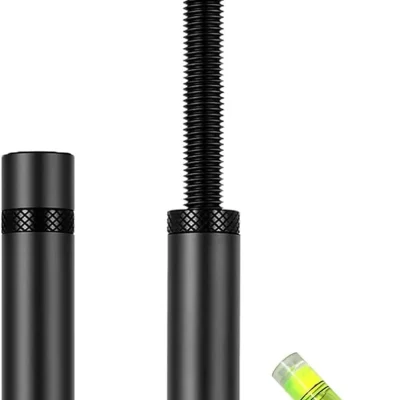
A GPU support bracket helps support the weight of a graphics card. It may be useful for a long or heavy card that dips at its outer end.
The listed adjustable brackets include models with a height range of 74mm to 120mm. Measure the space where you plan to place the bracket before choosing.
Check that the base has a suitable place to rest. A magnetic base needs a surface it can attach to. The top of the bracket must support a suitable part of the card without blocking its fans.
A support bracket does not make a graphics card faster. Its job is to provide physical support within a suitable setup.
A fan splitter lets more than one fan connect to a single motherboard fan socket. This can be useful when your build has more fans than available sockets.
This category includes Cable Matters three-way fan splitter cables. Check the number of connections, cable length, and supported fan plugs.
A splitter does not increase the power available from the motherboard socket. Compare the fans' combined power needs with the socket's limit in your motherboard guide.
Keep cables clear of fan blades when planning the route. Choose enough length to reach each fan without pulling the wires tight.
Decide what you want to fix or add. You may need a replacement fan, a cooler for a new processor, or support for a heavy graphics card.
Choose a part that addresses that need. More fans or a larger cooler will not solve every computer problem.
Keep your case, motherboard, and processor model names nearby while shopping. For graphics card support, note the card model and measure the available space.
Compare these details with the product page and the maker's fit guide. Exact model details are more useful than a general description such as “gaming PC.”
Look for mounting brackets, screws, cables, and thermal paste. Some products rely on parts already fitted to your motherboard.
Read the installation guide before taking your computer apart. If you are unsure about fitting internal parts, ask a repair technician for help.
Desktop fans and coolers usually do not fit inside laptops. Laptop parts often need to match a specific model and part number.
Visit our laptop replacement parts category if you are working on a laptop. Check the listed fit before ordering.
This category focuses on cooling and support parts. The listings include thermal paste, CPU coolers, case fans, graphics card support brackets, and fan splitter cables.
Check the supported processor socket, mounting parts, and cooler height. Also confirm there is enough room around the memory and inside the case.
Most standard CPU cooler setups need thermal paste between the processor and cooler. Check whether your cooler already has paste applied or includes a tube.
Not always. Check the case's supported fan size, available thickness, and mounting points. Also compare the fan plug with your available connections.
A suitable splitter may allow this. The fans' combined power needs must stay within the motherboard socket's limit. Check the motherboard and splitter instructions.
No. It depends on the card's size, weight, and mounting. Check the graphics card maker's advice and whether your case already provides suitable support.
Internal parts fit inside the computer. External devices connect from outside it. Browse our external components for products such as USB disc drives and portable hard drives.
Find cooling and support parts that suit your computer. Compare sizes, connections, and included parts before making your choice.
Explore our wider computers and accessories range, or visit the Right Tech Store shop for more products.









