




Description
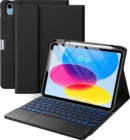
Harvopu Keyboard Case with Trackpad for iPad 11th Gen (A16) and 10th Gen
Turn your iPad into a small laptop. The Harvopu keyboard case has a built-in trackpad. So you can type and move the cursor without touching the screen.
Need tablet mode? The keyboard pulls off with a magnet. Put it back when you need to type again.
Key Benefits
- Built-in trackpad: Tap, swipe, scroll, and switch apps with your fingers.
- Magnetic keyboard: Snaps on for typing. Pulls off for tablet use.
- 7-color backlight: Seven colors and three brightness levels for dark rooms.
- iPadOS shortcut keys: One-press keys for common tasks.
- 3 viewing angles: Grooves hold your iPad at three tilts.
- 420mAh battery: Sleeps after 15 minutes of no use to save power.
- Auto reconnect: Pair once and it connects each time you turn it on.
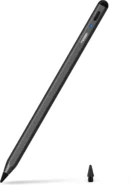
- Pencil holder: Keeps your stylus with the case.
Compatibility
- iPad 11th Gen (A16) 11 inch, 2025: A3354, A3355, A3356
- iPad 10th Gen 10.9 inch, 2022: A2696, A2757, A2777
Not for any other iPad. Check the “A” number on the back of your iPad.
Product Specifications
- Brand: Harvopu
- Keyboard: Bluetooth, magnetic, detachable
- Trackpad: Built-in, multi-touch
- Backlight: 7 colors, 3 brightness levels
- Battery: 420mAh, USB-C, 2 to 3 hours to charge
- Auto sleep: After 15 minutes
- Case: Folio with 3 angle grooves
Who Is It For?
- Laptop switchers: Get a keyboard and trackpad feel on your iPad.
- Students: Type papers and move between tabs faster.
- Remote workers: Answer emails and edit docs on the go.
- Night owls: Backlit keys help in low light.
How to Use
Charge the keyboard first. Turn it on. Open Bluetooth on your iPad. Hold Fn and C for 3 seconds. Tap “Bluetooth Keyboard” on your iPad to connect. Next time, it connects on its own when you turn it on.
Why Choose the Harvopu Trackpad Keyboard Case?
A plain keyboard still makes you reach up to tap the screen. The trackpad on this case fixes that. You can type, point, and scroll like on a laptop. The keyboard comes off when you just want to read or draw.
What Is in the Box?
- 1 x folio case
- 1 x wireless keyboard with trackpad
- 1 x USB-C charging cable
- iPad and pencil not included
Frequently Asked Questions
What gestures does the trackpad support?
Tap to click, two-finger scroll, swipe between apps, and more.
Can I use the keyboard with other devices?
Yes. It can pair by Bluetooth with other devices too.
Does the case cover the screen?
Yes. The folio cover closes over the screen.
How long does the battery last?
It depends on backlight use. Using the light on high drains it faster.
Do I have to pair it every time?
No. It reconnects on its own after the first pairing.
Will it fit with a screen protector?
Yes, with normal screen protectors.












