
Your cart is currently empty!.
You may check out all the available products and buy some in the shop.
Continue Shopping









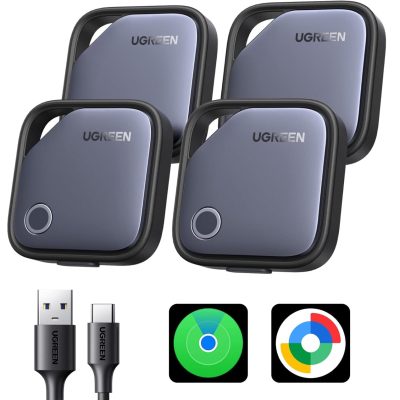
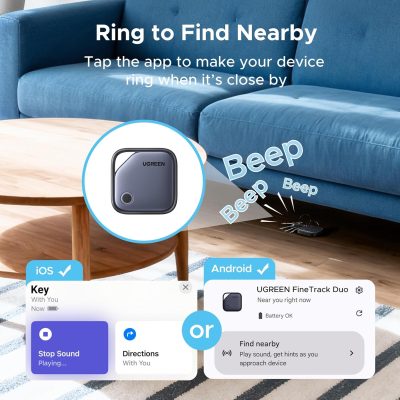
The UGREEN Finder Duo Air Tracker Tags (4-Pack) work with both Apple Find My (iOS) and Google Find Hub (Android) — cross-platform tracking for mixed-device households. USB-C rechargeable battery provides 365 days per charge with no disposable batteries. End-to-end encryption certified by Apple and Google. Play sound nearby or view global map location through crowd-sourced networks. Lost Mode with contact information for item recovery. Family sharing supported (iOS 17+ / Android 9.0+). Dust plug protects USB-C port. No subscription fees. Each tracker pairs with one platform at a time — cannot connect to iOS and Android simultaneously.


The BOSILLEY Magnetic Car Phone Holder mounts to your dashboard through a 3-inch washable, reusable nano gel base with 24 upgraded N55 magnets for secure MagSafe-compatible attachment. Zinc alloy reinforced pivot joint tested through 3,000+ adjustment cycles. Three-point positioning: 360° base rotation, 210° arm, 210° magnetic head. Foldable flat when not in use. Direct MagSafe attachment for iPhone 17-12 series. Metal rings included for Samsung Galaxy, Google Pixel, and non-MagSafe phones. Rinse nano gel with water to restore adhesion. For dashboard mounting on flat, clean surfaces.


The WeatherTech CupFone sits inside your vehicle's existing cup holder for stable phone mounting without suction cups, adhesive, or clips. Interchangeable base cup system fits most cup holders in cars, trucks, SUVs, boats, and RVs. Included StickySleeve provides snug grip preventing movement. Adjustable tilt and rotation for optimal viewing angle. Open-access design for charging while mounted. Fits phones 2.37"–3.37" wide, up to 0.56" deep — compatible with iPhone 16 Pro Max, Galaxy S25 Ultra, Pixel 9 Pro, and most smartphones. Designed and manufactured in the USA. Lifetime Limited Warranty. Black.


Browse computer accessories for work, school, and home use at RightTech Store. Find items for your desk, laptop, or next computer project.
Explore the categories below to find what you need. Compare sizes, features, and device support before you buy.
Choose a keyboard and mouse that suit your daily tasks. Think about your desk space, hand size, and how you like to type.
Browse keyboards, mice and accessories for your setup. Check the connection type before choosing a wired or wireless model.
A compact keyboard saves desk space. A full-size keyboard adds a number pad for tasks like working with numbers.
The right accessories can help you arrange your screen and desk. Start by checking your monitor’s size, model, and ports.
Explore monitor accessories for your workspace. Read each product’s details to make sure it fits your screen.
A webcam helps you join video calls, online classes, and work meetings. Check the picture quality and connection type before you choose.
Browse webcams and VoIP equipment for your calling needs. VoIP equipment lets you make voice calls over the internet.
Also, check whether the device works with your computer and calling app.
A worn or broken part does not always mean you need a new laptop. Start by finding your laptop’s exact model number.
Explore laptop replacement parts to look for a matching part. Check the part number, size, and connection before buying.
Parts can look alike but fit different models. Read the details closely to avoid choosing the wrong one.
Keep your files and discs in order with storage that suits your needs. Think about what you want to store and how much space you have.
Browse media storage and check each item’s purpose. Look at its size and the type of media it holds.
A single board computer puts the main computer parts on one small board. You can use one to learn coding or build a small project.
Explore single board computers for your next idea. Check the memory, ports, and power needs before you choose.
Some boards need extra items, such as a case or power supply. Read the product details to see what comes in the box.
Before you buy, take a moment to check a few key details:
Browse the RightTech Store shop to find products for your setup. Open each listing to check the features and choose a suitable match.
Check your computer’s model, ports, and operating system. Compare these details with the product’s requirements.
Many keyboards, mice, and webcams work with both. Your laptop needs the right port or wireless connection.
Check the laptop model and the exact part number. Match both with the product details before you order.
No. Box contents vary by product. Read the listing to check whether you need a separate cable, battery, or power supply.
Measure your space first. Compact keyboards and smaller accessories can help leave more room for other tasks.