
Your cart is currently empty!.
You may check out all the available products and buy some in the shop.
Continue Shopping



The Bicycle 5 Dice Set includes five premium-quality standard 16mm six-sided D6 dice with crisp black pips on white faces. Manufactured with recycled and sustainably sourced raw materials by America's most trusted playing card and game accessory brand. Balanced weight distribution for fair rolling across board games, Yahtzee, Farkle, card games, classroom math activities, and party gaming. 100% satisfaction guarantee backed by over 50 years of Bicycle game product heritage.






Find gaming accessories for your desk, computer, or console at RightTech Store. Shop wired and wireless mice, game controllers, mouse pads, and HDMI cables. You can also explore cooling parts, wired earbuds, and memory cards for supported devices.
Start with the way you like to play. A mouse may suit your favorite PC games. A controller may feel more natural for racing, sports, or platform games.
Compare each product before you buy. Check the device list, connection type, and size. Choose gear that fits your setup and feels easy to use.
The right gaming gear depends on your device and the games you enjoy. You may play at a small desk, on a laptop, or from the couch. Each setup has different needs.
For desk gaming, think about mouse space and cable reach. For couch play, check the controller connection and battery needs. If you use more than one device, make sure your gear supports each one.
Browse our gaming accessories and focus on the features you will use. A useful upgrade should solve a clear need, such as a worn mouse or a cable that is too short.
A gaming mouse helps you move, aim, and select items in supported games. Models vary in shape, weight, and button layout. Choose one that feels comfortable for your hand.
Our range includes options from Logitech and Redragon. Compare wired and wireless models to find the best fit for your desk.
Some mice have extra buttons that you can set for certain actions. Others let you change the weight or lights. Check whether these settings need software.
A wired gaming mouse connects to your computer with a cable. You do not need to charge it or replace a battery.
Check the cable length so you have room to move. Keep the cable clear of the edge of your desk. This helps stop it from catching as you play.
The Logitech G502 HERO and Redragon M612 are examples in this category. Both offer buttons that can be set for different tasks through supported software.
A wireless gaming mouse gives you room to move without a cable across your desk. Check how it connects before buying. Some use a small USB receiver rather than Bluetooth.
The Logitech G305 uses a USB receiver and an AA battery. It also has space to store the receiver when you carry it.
Look at battery needs, mouse size, and weight. These details matter more than choosing a mouse based only on its lights or color.
Mouse sensitivity affects how far the pointer moves when you move your hand. Product pages often call this setting DPI.
A higher setting makes the pointer move farther with a small hand movement. A lower setting needs more hand movement. Try different settings to find what feels right for you.
A gaming controller puts the main controls within reach of both hands. It can be a useful choice for driving games, sports games, and many other titles.
Our selection includes wired and wireless controllers. Some support Windows computers and Android devices. Others are made for Xbox or selected Nintendo systems.
Always check the exact product details. A controller that works on a PC will not always work on your console.
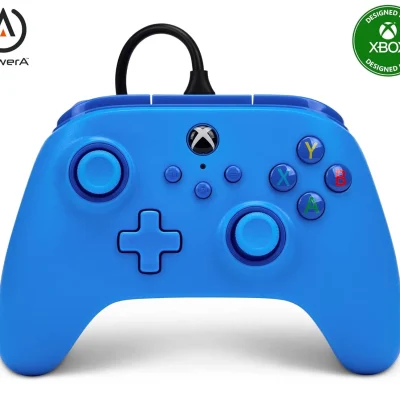
A wired Xbox controller connects through a cable. This means you can play without charging a controller battery.
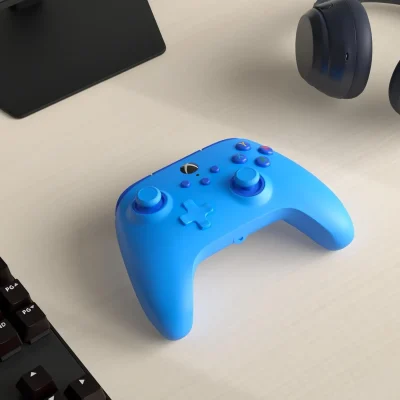
The PowerA model in this category supports Xbox Series X|S, Xbox One, and PC. It includes a long cable and a headset socket.
Check the cable length against the distance to your seat. Leave a little spare length so the cable does not pull tight while you play.
A wireless controller lets you sit away from your computer. Some models connect through Bluetooth. Others use a USB receiver.
The range includes the AceGamer Aurora II and 8BitDo Ultimate 2C. Each has its own device list and connection options. Read those details before choosing one.
Some controllers have extra buttons you can set for in-game actions. Check how those buttons work and whether the game supports your chosen controls.
Do not judge console support by a controller's shape or the name shown during pairing. For example, the AceGamer listing states that it does not work with Xbox consoles.
A gaming mouse pad gives your mouse a steady surface. It can also make your desk feel more comfortable under your hand and wrist.
A larger pad gives you more room for wide mouse movements. This may help if you prefer a lower sensitivity setting.
The Razer Gigantus V2 XXL in this category has a cloth surface and a rubber base. The base helps hold the pad in place as you move the mouse.
Measure your desk before buying an extended gaming mouse pad. Leave space for your keyboard, screen stand, and other items. Check the full dimensions on the product page.
An HDMI cable carries picture and sound between supported devices. Use one to connect a console or computer to a TV or monitor with an HDMI port.
Choose a cable that reaches without pulling tight. A short cable can keep nearby devices tidy. A longer cable may suit a console on a lower shelf.
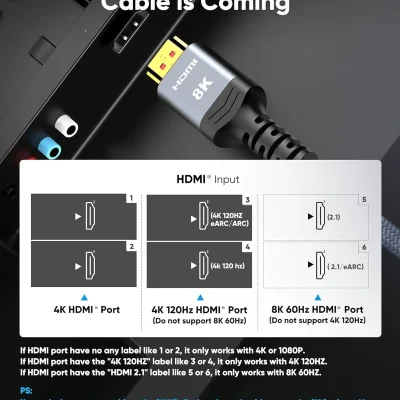
This category includes Highwings and UGREEN HDMI cables in different lengths. Compare the listed picture and display support before buying.
For smoother motion at a high picture setting, the whole setup must support it. The console or computer, screen, ports, and cable all need to work together.
A cable alone cannot make an older screen show a higher setting. Check your screen and device guides if you are unsure.
Your computer's processor creates heat while it works. A CPU cooler moves heat away from it. The CPU is the main chip that handles many of your computer's tasks.
The Thermalright Assassin X120 Refined SE is an air cooler in this category. It uses a fan and metal cooling parts to carry heat away from the processor.
Before buying, check that the cooler fits your processor's mounting type. Also check the space inside your computer case.
Cooler height matters. Nearby memory parts can also affect the fit. Read the product dimensions and supported mounting list before ordering.
Explore our gaming hardware for parts that match your computer.
Smaller accessories can also be useful for gaming. Wired earbuds give you a light option for sound. A memory card can add storage to a device that supports it.
The Skullcandy Jib earbuds in this category use a 3.5 mm plug. Check that your computer, controller, or device has the right socket.
Also check microphone support if you want to speak with friends. Sound and microphone features can vary by device. Some computers may need a separate adapter.
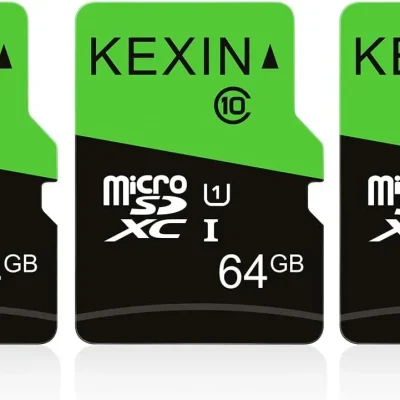
A microSD card can store files on devices that accept that card type. Before buying, check the required card format, speed, and size limit.
Do not assume every gaming device accepts the same card. Some need a different type or a faster standard.
The KEXIN pack contains three separate 64GB cards. They remain three separate cards, rather than one larger card.
Gaming can also mean time around a table with family or friends. A spare dice set is useful when a board game loses a piece.
The Bicycle set in this category includes five standard six-sided dice. Use them with games that call for that type of dice. They can also be useful for counting games and simple classroom tasks.
Start with the item you use most. For PC play, this may be a comfortable mouse and mouse pad. For console play, check your controller and screen cable first.
Both can work well. A wired mouse avoids battery changes. A wireless mouse removes the cable from your desk. Choose based on comfort, connection, and battery needs.
Not always. Check the controller's supported device list. Some controllers work with Windows but do not support Xbox consoles.
Choose a pad that fits your desk and hand movements. A large pad gives you more room to move. A smaller pad may suit a compact workspace.
A suitable cable supports the picture and sound your devices can provide. It cannot increase what your screen or console supports. Check the full setup before buying.
No. The cooler must fit your processor's mounting type and your case. Check the supported models, height, and space around other parts.
No. Your device may require a certain card type and speed. Check its storage guide before choosing a memory card.
Build a setup that suits the way you play. Choose a mouse that fits your hand, a controller that supports your device, and cables that reach your screen.
Compare the details and included items before ordering. Visit the RightTech Store shop to find more accessories for your computer and gaming space.







