
Your cart is currently empty!.
You may check out all the available products and buy some in the shop.
Continue Shopping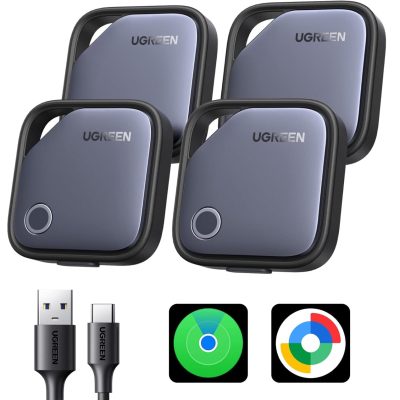
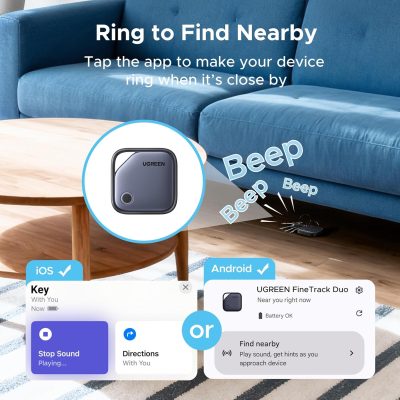
The UGREEN Finder Duo Air Tracker Tags (4-Pack) work with both Apple Find My (iOS) and Google Find Hub (Android) — cross-platform tracking for mixed-device households. USB-C rechargeable battery provides 365 days per charge with no disposable batteries. End-to-end encryption certified by Apple and Google. Play sound nearby or view global map location through crowd-sourced networks. Lost Mode with contact information for item recovery. Family sharing supported (iOS 17+ / Android 9.0+). Dust plug protects USB-C port. No subscription fees. Each tracker pairs with one platform at a time — cannot connect to iOS and Android simultaneously.


This Ultra-Thin Wallet Tracker Card measures just 0.06 inches thick (1.96 x 2.75") — credit-card dimensions sliding into wallet slots without added bulk. Apple MFi certified for Find My (iOS only). 100dB built-in speaker with sound, distance, and direction cues for locating items in noisy environments. Wireless Qi charging — no USB port, maintaining ultra-thin profile. Battery designed for up to 10 years of service. Waterproof and scratch-resistant. No monthly subscription fees. For wallets, card holders, passport sleeves, luggage, backpacks, and keys. NOT compatible with Android.


The Tracki Pro GPS Tracker is a hidden 4G LTE magnetic tracker for cars, vehicles, and assets with real-time location and smart alerts. Strong magnet, weatherproof build, and battery that lasts for months. Perfect for parents and fleet owners. Subscription required, cancel anytime.


Find electronics and accessories for the things you do each day. Connect a screen, tidy your desk, take photos, or find misplaced keys. Right Tech Store brings these useful items together in one place.
Browse Bluetooth trackers, wallet finders, cables, power strips, and digital cameras. You can also explore audio and video accessories for your desk, car, or home.
Start with the task you want to make easier. Then compare the size, features, and device support on each product page. A few simple checks can help you choose the right item.
Misplaced keys can slow down your morning. A key finder helps you look for a tagged item. Depending on the model, you can use a phone app or a small remote to make it ring.
Our range includes tracker tags for keys, bags, backpacks, and luggage. There are also slim wallet trackers that fit inside a card slot.
Check phone support before you buy. Some trackers work with Apple Find My. Others support Google Find Hub. A tracker made for one system may not work with the other.
Battery type matters too. Some models use a battery you can replace. Others need charging. Read the listing to see how the tracker gets power and whether a charger is included.
Explore our GPS, finders, and accessories to compare the available options.
A small tag can attach to a key ring. A flat card may fit better in a wallet. For use around the house, a remote key finder can be useful if you prefer not to use a phone app.
Read the setup steps before choosing. Check whether the item needs an app, a supported phone, or a paid plan. These details vary between products.
The right cable helps connect the devices you already own. You may need an HDMI cable for a screen, a USB cable for a device, or an audio cable for speakers.
Start by checking the ports on both devices. These are the sockets where the cable plugs in. The ends must match, or you may need a suitable adapter.
Measure the distance before buying. Leave enough room to move the device without pulling the cable tight. This is useful for screens on stands and equipment placed behind a desk.
For HDMI cables, check support for the picture settings you want to use. The cable, screen, and connected device all need to support those settings.
Visit our cables and accessories section to find options for your setup.
Audio and video accessories help you connect and use your entertainment equipment. They can be useful for a TV area, gaming desk, or home office.
For example, an HDMI switch can let compatible devices share a screen input. You can switch between devices without moving the cable each time.
Check how many devices the switch accepts. Also check how you select a device and whether the switch needs its own power supply.
If you want to connect two screens, read the listing carefully. Some products select one screen at a time. Do not assume every switch can show a picture on both screens at once.
Browse our audio and video accessories for products that suit your equipment.
A desk can fill up with plugs quickly. A laptop, lamp, screen, and phone charger may all need power. A power strip gives you more connection points in one place.
Compare the number of outlets and the space between them. Large plugs can block nearby sockets if the outlets sit too close together.
Some models also include USB ports. Check the type of USB port and its listed charging output. The number of ports alone does not tell you how fast a device will charge.
Look at the cord length and the size of the strip. A tower shape may fit a desk differently from a flat strip. Choose a design that leaves the controls easy to reach.
Read the product details for its power limit and protection features. Check for stated surge protection if you need it. Follow the maker's instructions for safe use.
Compare our power strips and surge protectors before making your choice.
Loose cords can make a desk harder to clean and use. Cable management accessories help keep wires together and make your space easier to arrange.
Reusable cable ties are useful when your setup changes often. You can open them, add or remove a cable, and fasten them again.
Use them to group cords behind a screen or keep spare cables in a drawer. They can also help organize charging cables in a travel bag.
Leave enough slack for each device to move. Avoid pulling cords tight or bending them sharply. Keep cables you use often within easy reach.
See our cord management accessories for simple ways to organize your space.
A digital camera gives you a separate device for taking photos. When choosing one, think about who will use it and where they will take it.
For a beginner, clear buttons and a simple menu can matter more than a long feature list. Check the camera size, screen, battery type, and controls.
Read the box contents too. Check whether the camera includes a memory card, battery, and charging cable. This helps you plan for any extras you may need.
Explore our digital cameras to compare the listed features.
If you are setting up a space for photos or videos, browse our photo studio accessories. Check each item's size and setup needs against the space you have.
Think about the problem you want to solve. Do you need to find keys, connect a screen, or organize cords? Start with that need to keep your search focused.
Write down your phone, computer, camera, or TV model. Compare it with the product's supported devices. A similar name or matching plug does not always mean every feature will work.
Some items need a separate cable, battery, or charger. Check the package details before ordering. This can help you avoid missing a part needed for setup.
Look beyond the item price. Check for required extras or service fees. This is especially useful when comparing trackers that use different apps or paid plans.
You can browse trackers, key finders, cables, power strips, cable organizers, digital cameras, and audio and video accessories. Check individual listings for current availability.
No. Phone support depends on the model. Read the listing to check whether it supports Apple Find My, Google Find Hub, or another app.
Yes. The listed Reyke key finder uses a handheld remote to ring its tags. Check the product page for its range and included parts.
Measure the route between your devices. Allow a little extra room for movement and routing around furniture. Avoid a fit that pulls on the ports.
Yes. They help keep loose cables together in a bag. Choose a size that fits your cables without forcing them into tight bends.
Compare your device model, ports, and power needs with the product details. Check any app or software requirements before you order.
Choose useful electronics that fit your daily needs. Find a tracker for your keys, a cable for your screen, or an organizer for your desk.
Browse this category to compare products. You can also visit the Right Tech Store shop for more accessories for home, work, and travel.









